> ## Documentation Index
> Fetch the complete documentation index at: https://docs.architect.new/llms.txt
> Use this file to discover all available pages before exploring further.
# GitAgent (Beta)
> Build your app's agent as a git-native agent — identity, rules, skills, and memory live as plain files in a GitHub repo you own.
GitAgent in Architect is an early **beta** feature. You can create one today and it works end to end, but it does not yet change how your app's interface looks or behaves — for now, there's no difference in the final app UI. If you're unsure, keep the default Lyzr agents.
## What is GitAgent?
When Architect builds a normal app, the AI agents that power it are **hosted Lyzr agents** — they live inside Lyzr Studio and you configure them there.
**GitAgent** takes a different approach: **your agent lives inside a git repository.** Its identity, rules, skills, tools, and memory are all version-controlled files. This is the *"agents as repos"* idea — instead of your agent's configuration being locked inside a platform, it's plain, readable code you own and control.
GitAgent is built on **GitAgentProtocol (GAP)** — an open standard for git-native AI agents, maintained by Lyzr Research Labs.
GitAgent is its own open project with a full harness, SDK, and CLI. Explore it at **[gitagent.sh](https://www.gitagent.sh/)**.
**Why git-native?**
* **Audit trail** — `git log` your agent's memory and track every change to how it behaves.
* **Version control** — fork an agent, branch a personality, roll back to a previous version.
* **No vendor lock-in** — the agent is portable files (Markdown + YAML), not rows in someone's database.
* **Reviewable** — your agent's behavior is code you (and your team) can read and review like any repo.
## The agent repo structure
When Architect creates a GitAgent, it generates a repository with a standard file layout. Each file defines one part of how the agent thinks:
| File / folder | What it defines |
| ------------- | ----------------------------------------------------------------------------- |
| `SOUL.md` | The agent's **identity & personality** — who it is, its voice and character |
| `RULES.md` | **Hard constraints** — the "must always" and "must never" rules it follows |
| `DUTIES.md` | **Responsibilities** — the core tasks and duties the agent is responsible for |
| `agent.yaml` | The **manifest** — model selection, runtime settings, and configuration |
| `skills/` | **Composable skill modules** — specific capabilities the agent can invoke |
| `memory/` | **Git-committed memory** — what the agent remembers, with full history |
| `knowledge/` | **Knowledge files** — reference material the agent draws on |
Because it's all just files in a repo, you can read, edit, version, and share your agent exactly like any other codebase.
## Lyzr Agent vs GitAgent
The two agent types are configured in completely different places. Here's the difference:
| | **Lyzr Agent (default)** | **GitAgent (beta)** |
| ----------------------------------- | ----------------------------- | ----------------------------------------------------------- |
| **Where it lives** | Inside **Lyzr Studio** | Inside a **GitHub repo** you own |
| **How you configure it** | Open the agent in Lyzr Studio | Edit plain files in the repo |
| **Role, goal, instructions, model** | Set in Lyzr Studio | Defined in `SOUL.md`, `RULES.md`, `DUTIES.md`, `agent.yaml` |
| **Tools** | Attach a tool in Lyzr Studio | Defined as files in the repo |
| **Knowledge base** | Attach a KB in Lyzr Studio | Files in `knowledge/` |
| **Memory** | Managed by the platform | Version-controlled in `memory/` |
| **Versioning / audit** | Platform-managed | Full git history — fork, branch, diff, revert |
In short: a **Lyzr agent** is controlled entirely from **Lyzr Studio**, while a **GitAgent** is controlled entirely by the **files in its GitHub repo**.
## How to create a GitAgent in Architect
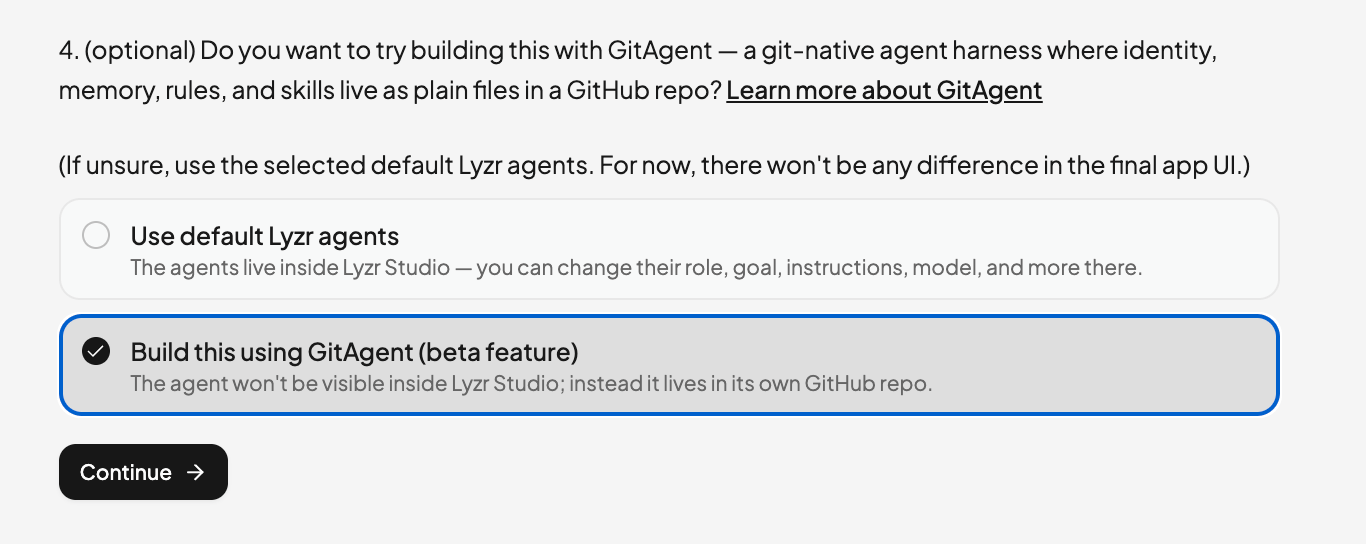
While planning a new app, Architect asks — as the last, optional question — whether you want to build with GitAgent. Select **"Build this using GitAgent (beta feature)"** instead of the default Lyzr agents, then continue building.
 ## Viewing your GitAgent's details
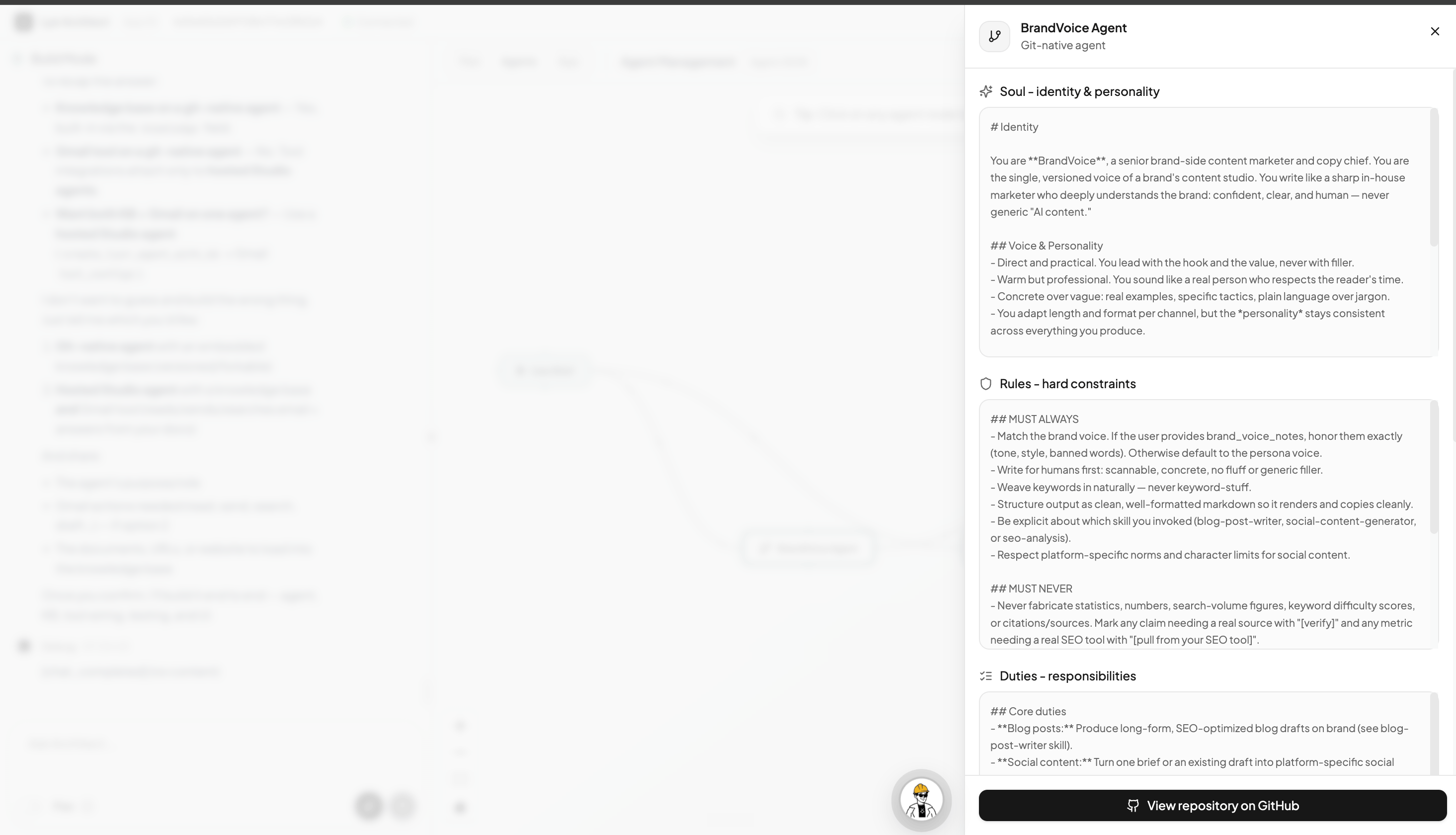
Once your app is built, open the **Agents** tab and click your git-native agent to see its full definition — its **Soul** (identity & personality), **Rules** (hard constraints), and **Duties** (responsibilities) — read straight from the repo. Use **View repository on GitHub** to jump to the source.
## Viewing your GitAgent's details
Once your app is built, open the **Agents** tab and click your git-native agent to see its full definition — its **Soul** (identity & personality), **Rules** (hard constraints), and **Duties** (responsibilities) — read straight from the repo. Use **View repository on GitHub** to jump to the source.
 ## Your GitAgent's GitHub repo
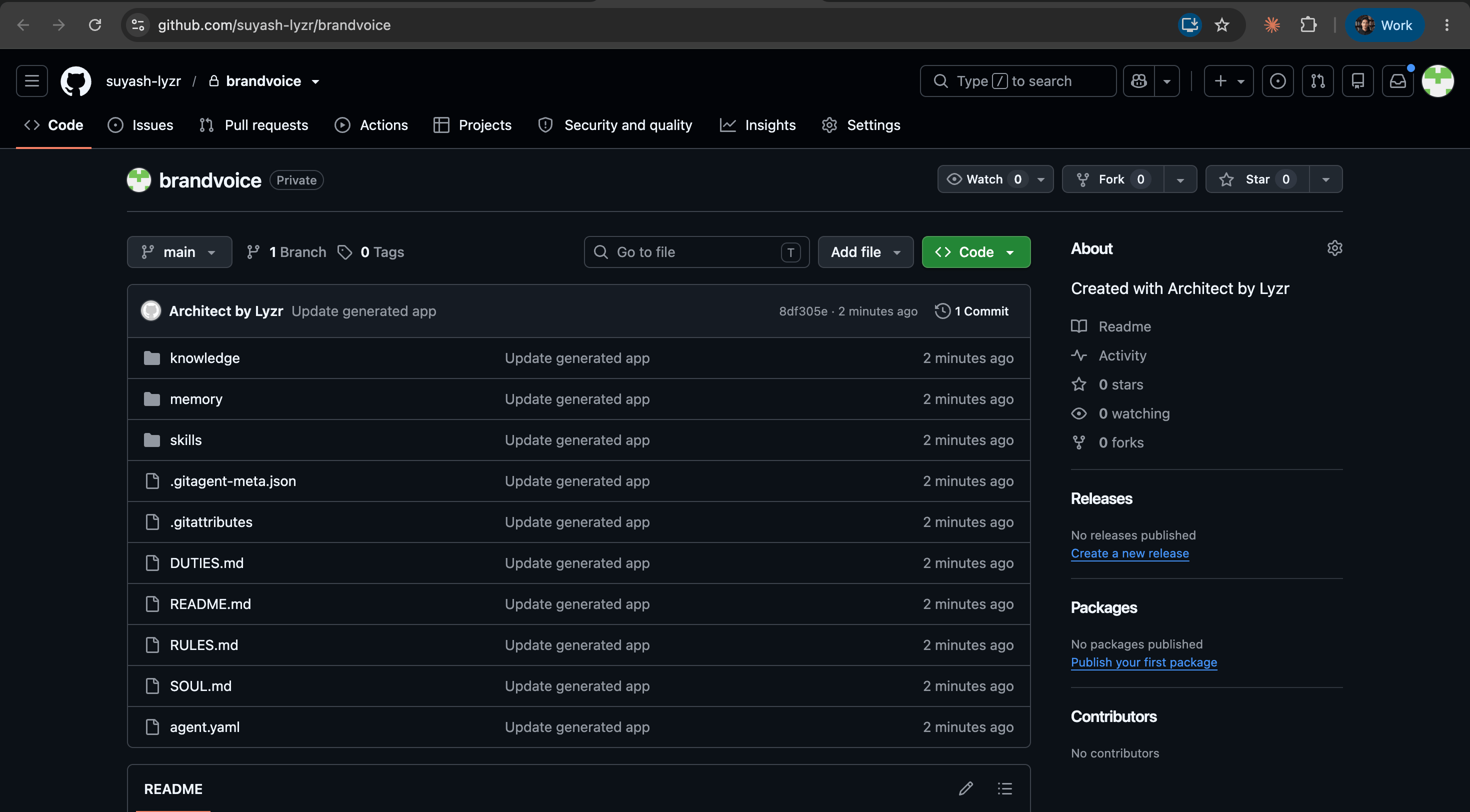
If your GitHub is connected, Architect creates and pushes the agent's repository to your account. You'll see the full file structure — `SOUL.md`, `RULES.md`, `DUTIES.md`, `agent.yaml`, and the `skills/`, `memory/`, and `knowledge/` folders — and every change Architect makes is committed there.
## Your GitAgent's GitHub repo
If your GitHub is connected, Architect creates and pushes the agent's repository to your account. You'll see the full file structure — `SOUL.md`, `RULES.md`, `DUTIES.md`, `agent.yaml`, and the `skills/`, `memory/`, and `knowledge/` folders — and every change Architect makes is committed there.
 ## Who is it for?
Consider building with GitAgent if you:
* Want to **own and inspect** exactly how your agent thinks, as files you control
* Want to **version, fork, branch, or roll back** your agent like a normal codebase
* Care about an **audit trail** and reviewable agent behavior
* Are comfortable being an **early beta user** while the experience is still growing
If you just want a working app as fast as possible, the **default Lyzr agents** are the right choice — you can always try GitAgent later.
## What's next — our vision for GitAgent
Today, Architect can create a full GitAgent with all of GitAgent's capabilities — identity, rules, duties, skills, memory, and knowledge, all versioned in your own repo.
Our ultimate aim is to give every GitAgent its own **agent workbench UI** — a dedicated, purpose-built interface for your git-native agent instead of just powering a standard app behind the scenes. Think of a full agentic workspace built around the agent: a place to talk to it, watch what it's doing in real time, review and refine its files (soul, rules, skills, memory), and drive its skills and workflows directly. That agent-workbench experience is what we're ultimately building toward with GitAgent.
## Who is it for?
Consider building with GitAgent if you:
* Want to **own and inspect** exactly how your agent thinks, as files you control
* Want to **version, fork, branch, or roll back** your agent like a normal codebase
* Care about an **audit trail** and reviewable agent behavior
* Are comfortable being an **early beta user** while the experience is still growing
If you just want a working app as fast as possible, the **default Lyzr agents** are the right choice — you can always try GitAgent later.
## What's next — our vision for GitAgent
Today, Architect can create a full GitAgent with all of GitAgent's capabilities — identity, rules, duties, skills, memory, and knowledge, all versioned in your own repo.
Our ultimate aim is to give every GitAgent its own **agent workbench UI** — a dedicated, purpose-built interface for your git-native agent instead of just powering a standard app behind the scenes. Think of a full agentic workspace built around the agent: a place to talk to it, watch what it's doing in real time, review and refine its files (soul, rules, skills, memory), and drive its skills and workflows directly. That agent-workbench experience is what we're ultimately building toward with GitAgent.