> ## Documentation Index
> Fetch the complete documentation index at: https://docs.architect.new/llms.txt
> Use this file to discover all available pages before exploring further.
# Plan Mode
> While iterating on an app, flip the Plan toggle to think a change through with Architect before building it — then switch back to Build to ship it.
Once your app is built, you don't have to commit to a change the moment it crosses your mind. The chat box has a **Plan** toggle. Flip it on and Architect switches from *doing* to *thinking* — it plans the change, proposes ideas and an approach, and breaks the work down, all **without touching your code**. Flip it off and you're back in **Build** mode, where Architect implements.
Because both modes share the same chat, you can move fluidly between them — plan an idea, build it, plan the next one — toggling as you go without ever losing context.
**Plan Mode vs. Planning & Brainstorming.** Plan Mode is for iterating on an app that **already exists**. To plan and brainstorm *before* your first build, see [Planning & Brainstorming](/build/planning-brainstorming).
## How to Use Plan Mode
In any app's build chat, find the **Plan** switch at the bottom-left of the message box and turn it on. Your next message will be sent in planning mode instead of build mode.
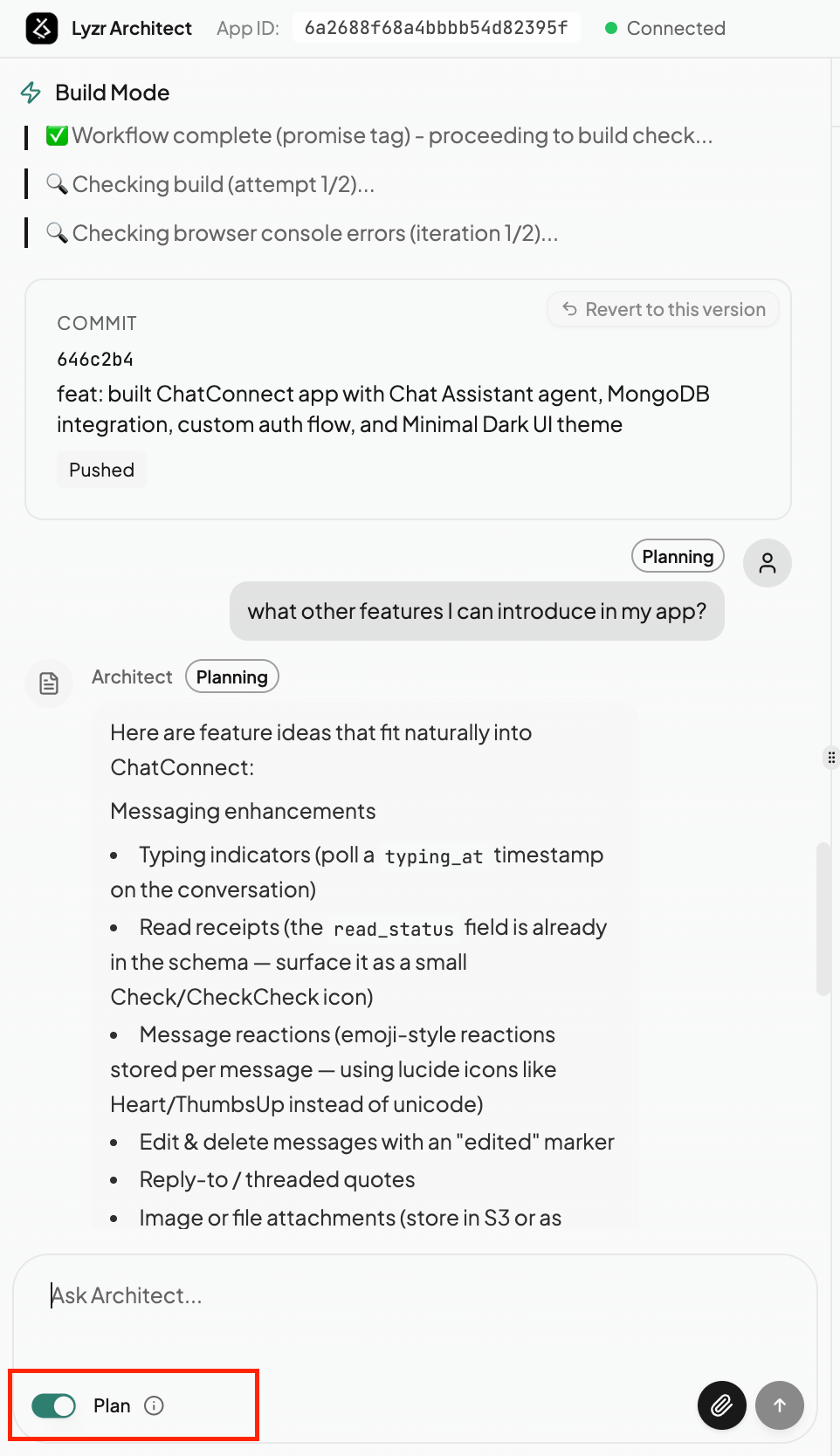 Describe what you're considering — *"what other features can I introduce in my app?"*, *"how would we add authentication?"*, or *"plan a redesign of the dashboard."*
Architect replies with a **Planning**-tagged answer: feature ideas, scope, trade-offs, and a suggested approach — laid out clearly so you can think it through. Nothing is built yet, so you're free to explore options and refine the idea with follow-up messages.
Happy with the plan? Toggle **Plan** back off to return to **Build** mode, then ask Architect to go ahead. The plan you just shaped becomes the blueprint for the change, so the build is faster and lands closer to what you intended.
## When to Use Plan Mode
Before a large or risky edit, map out exactly what needs to happen so the build doesn't go sideways.
Not sure what to add next? Ask Architect for ideas that fit your app — and pick the ones worth building.
Weigh different ways to solve a problem and agree on the direction before any code changes.
Lock in the plan first so you don't spend a build cycle on a change that wasn't quite right.
Plan and Build mode share one continuous conversation. Plan an idea, build it, then plan the next — just flip the toggle whenever you want Architect to think before it acts.
Describe what you're considering — *"what other features can I introduce in my app?"*, *"how would we add authentication?"*, or *"plan a redesign of the dashboard."*
Architect replies with a **Planning**-tagged answer: feature ideas, scope, trade-offs, and a suggested approach — laid out clearly so you can think it through. Nothing is built yet, so you're free to explore options and refine the idea with follow-up messages.
Happy with the plan? Toggle **Plan** back off to return to **Build** mode, then ask Architect to go ahead. The plan you just shaped becomes the blueprint for the change, so the build is faster and lands closer to what you intended.
## When to Use Plan Mode
Before a large or risky edit, map out exactly what needs to happen so the build doesn't go sideways.
Not sure what to add next? Ask Architect for ideas that fit your app — and pick the ones worth building.
Weigh different ways to solve a problem and agree on the direction before any code changes.
Lock in the plan first so you don't spend a build cycle on a change that wasn't quite right.
Plan and Build mode share one continuous conversation. Plan an idea, build it, then plan the next — just flip the toggle whenever you want Architect to think before it acts.