> ## Documentation Index
> Fetch the complete documentation index at: https://docs.architect.new/llms.txt
> Use this file to discover all available pages before exploring further.
# Planning & Brainstorming
> Before Architect builds anything, plan and brainstorm your idea with it — refine the requirements, preview how the app will look, and generate reusable artifacts that get handed straight to the build.
The moment you submit your first prompt, Architect doesn't jump straight into code. It drops you into **Planning mode** — a dedicated space to think your idea through, pin down the details, and *see* what you're about to build before a single line is written.
Here you can brainstorm freely, answer a few guided questions, preview the app's design, and produce supporting artifacts — a plan/PRD, a workflow diagram, skill files, even a PDF or slide deck — that are passed to the build so your app starts with real context instead of a blank slate.
Planning mode opens **automatically** as soon as you enter a prompt on the homepage. In a hurry? You can skip ahead to the build at any time with **Start Building**.
## How Planning Mode Works
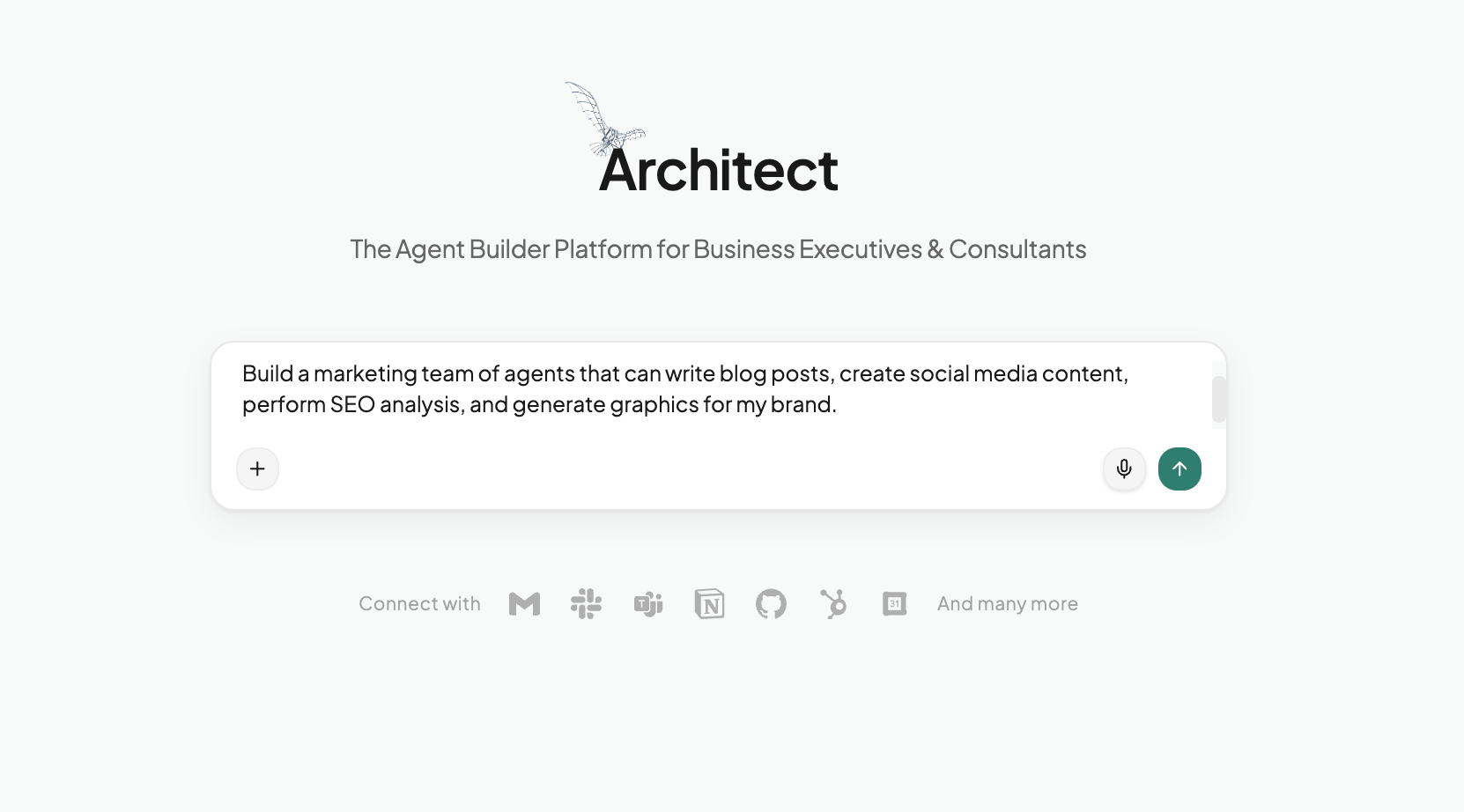
Describe what you want to build in plain language from the homepage — for example, *"Build a marketing team of agents that can write blog posts, create social media content, perform SEO analysis, and generate graphics for my brand."* No structure or technical detail required.
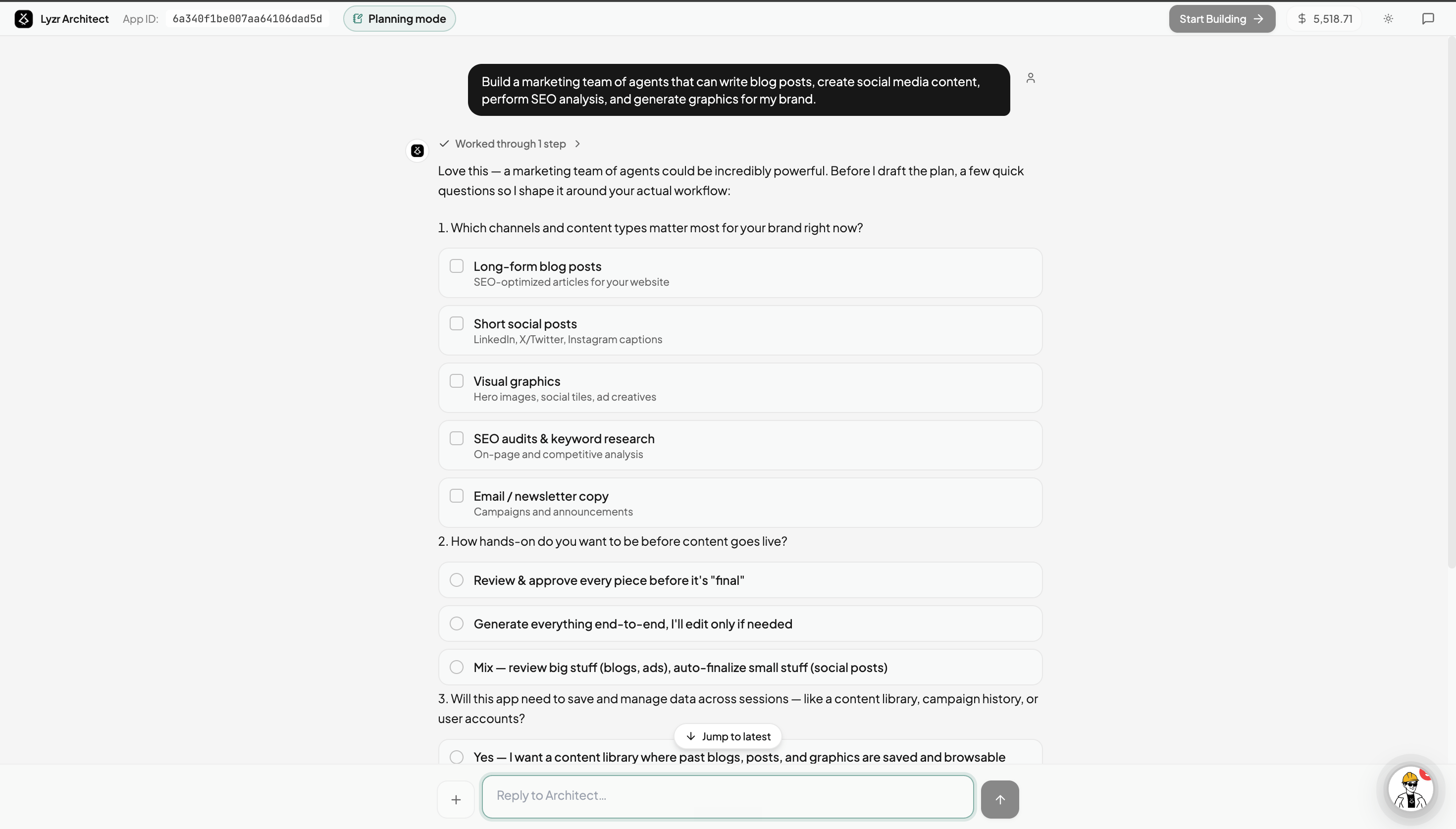
 Architect opens Planning mode and asks a few focused questions to understand your use case — which content types matter most, how hands-on you want to be, whether you need to save data across sessions, and more.
Pick from the suggested options or just type your own thoughts to brainstorm back and forth. Every answer sharpens the plan, so the result is shaped around *your* actual workflow rather than a generic template.
Architect opens Planning mode and asks a few focused questions to understand your use case — which content types matter most, how hands-on you want to be, whether you need to save data across sessions, and more.
Pick from the suggested options or just type your own thoughts to brainstorm back and forth. Every answer sharpens the plan, so the result is shaped around *your* actual workflow rather than a generic template.
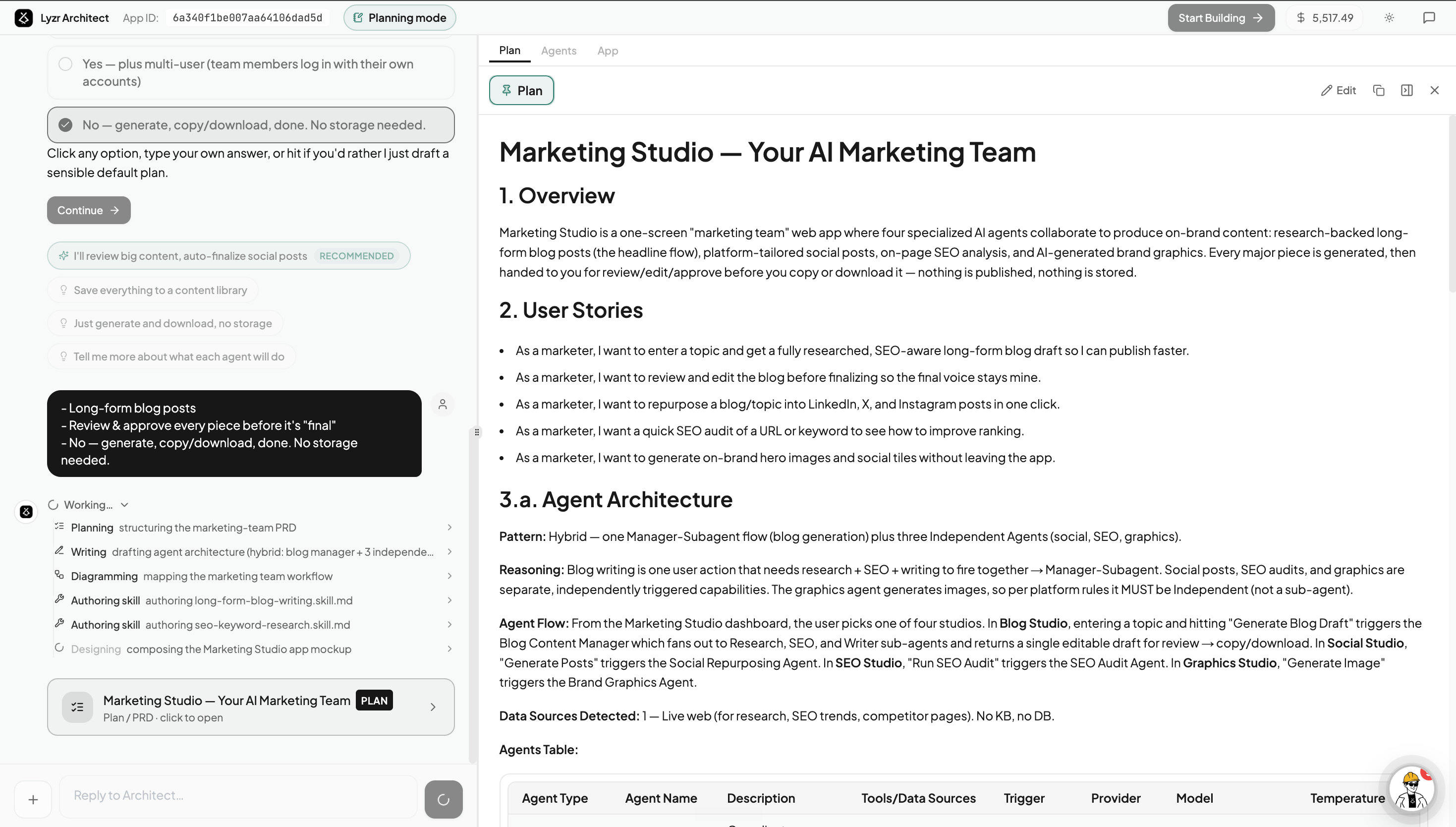
 From the conversation, Architect drafts a complete **plan / PRD** in the right panel — an overview, user stories, the **agent architecture** (which agents are needed and how they're orchestrated), detected data sources, and a full agent table listing each agent's model, tools, and role.
Want to change something? Just keep chatting — the plan updates live as you refine it.
From the conversation, Architect drafts a complete **plan / PRD** in the right panel — an overview, user stories, the **agent architecture** (which agents are needed and how they're orchestrated), detected data sources, and a full agent table listing each agent's model, tools, and role.
Want to change something? Just keep chatting — the plan updates live as you refine it.
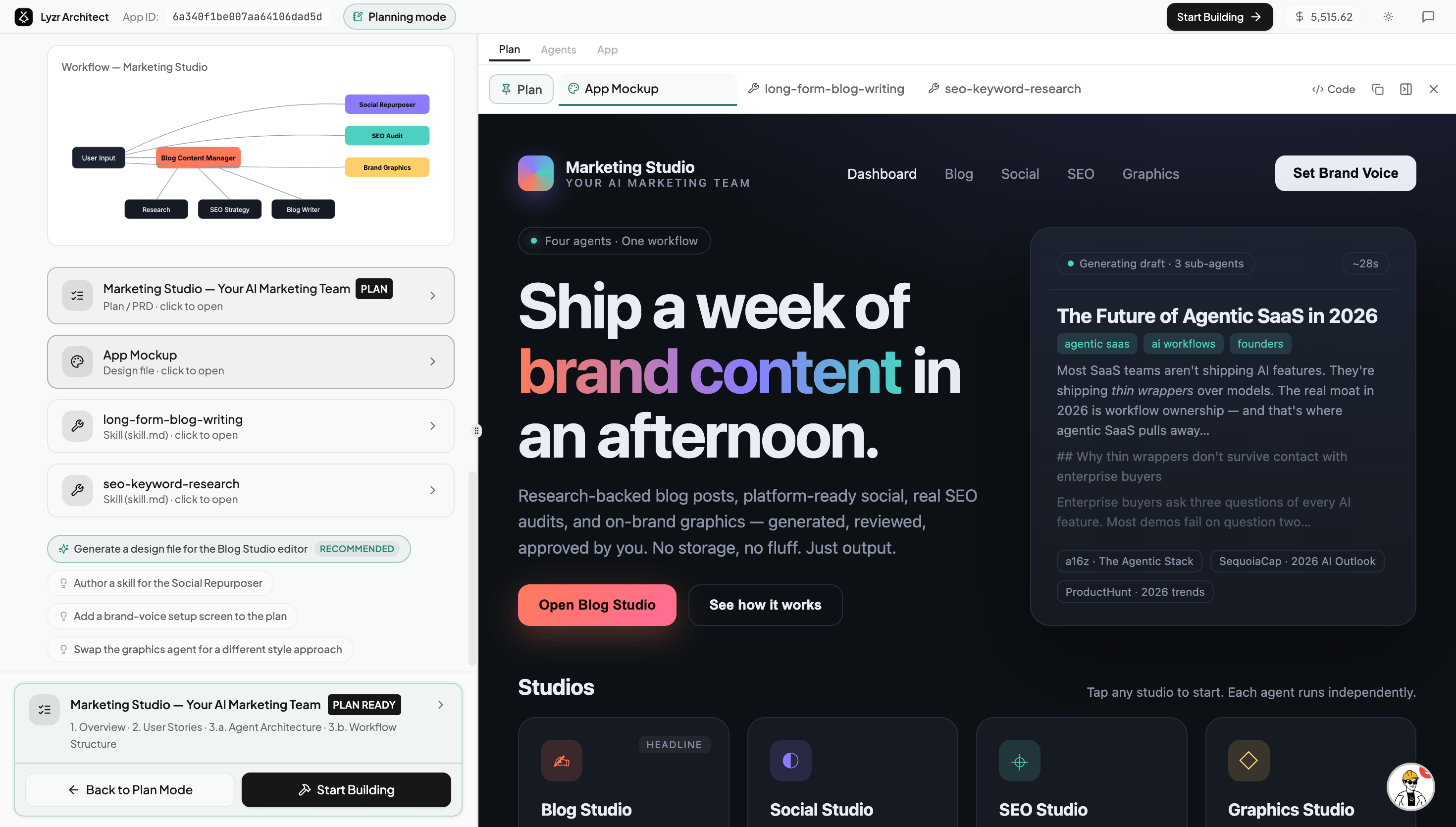
 Alongside the plan, Architect generates an **App Mockup** — a high-fidelity preview of how your finished app's UI will actually look — so you can brainstorm and iterate on the design *before* it's built. It also produces a **workflow diagram** of the agent flow and any **skill files** for specific tasks.
Each artifact opens in its own tab. Recommended follow-ups (for example, *"design the Blog Studio editor"* or *"author a skill for the Social Repurposer"*) appear as one-click suggestions so you can keep expanding the plan.
Alongside the plan, Architect generates an **App Mockup** — a high-fidelity preview of how your finished app's UI will actually look — so you can brainstorm and iterate on the design *before* it's built. It also produces a **workflow diagram** of the agent flow and any **skill files** for specific tasks.
Each artifact opens in its own tab. Recommended follow-ups (for example, *"design the Blog Studio editor"* or *"author a skill for the Social Repurposer"*) appear as one-click suggestions so you can keep expanding the plan.
 When the plan is marked **Plan Ready**, click **Start Building**. Everything you created in Planning mode — the PRD, the app mockup, the workflow diagram, and the skill files — is handed to the build, so Architect starts with a clear blueprint of exactly what you want.
Need to keep refining? Use **Back to Plan Mode** anytime.
## What You Can Generate
Planning mode is more than a chat — it's where you produce the building blocks your app is made from. Each of these is passed to the build automatically.
A high-fidelity design preview of your final app's UI. Brainstorm and iterate on the look and feel before any code is written.
A structured product requirements doc: overview, user stories, agent architecture, detected data sources, and the full agent table.
A visual map of how your agents connect, trigger one another, and hand off work.
Reusable instruction files for a specific task — like long-form blog writing or SEO keyword research — that your agents use once the app is built.
Export a polished document or slide deck for your use case — handy for sharing the concept or getting stakeholder buy-in.
Scaffold the supporting files your app will need so the build has somewhere to start.
Every artifact you generate in Planning mode is carried into the build. The more you plan and brainstorm here, the more context Architect has — and the closer the very first build lands to what you actually want.
When the plan is marked **Plan Ready**, click **Start Building**. Everything you created in Planning mode — the PRD, the app mockup, the workflow diagram, and the skill files — is handed to the build, so Architect starts with a clear blueprint of exactly what you want.
Need to keep refining? Use **Back to Plan Mode** anytime.
## What You Can Generate
Planning mode is more than a chat — it's where you produce the building blocks your app is made from. Each of these is passed to the build automatically.
A high-fidelity design preview of your final app's UI. Brainstorm and iterate on the look and feel before any code is written.
A structured product requirements doc: overview, user stories, agent architecture, detected data sources, and the full agent table.
A visual map of how your agents connect, trigger one another, and hand off work.
Reusable instruction files for a specific task — like long-form blog writing or SEO keyword research — that your agents use once the app is built.
Export a polished document or slide deck for your use case — handy for sharing the concept or getting stakeholder buy-in.
Scaffold the supporting files your app will need so the build has somewhere to start.
Every artifact you generate in Planning mode is carried into the build. The more you plan and brainstorm here, the more context Architect has — and the closer the very first build lands to what you actually want.